Digital Image Stitch Creator - Embroidery Software
RiCOMA - International Corporation
Embroidery:   Model:   go
g
g


Package Deals
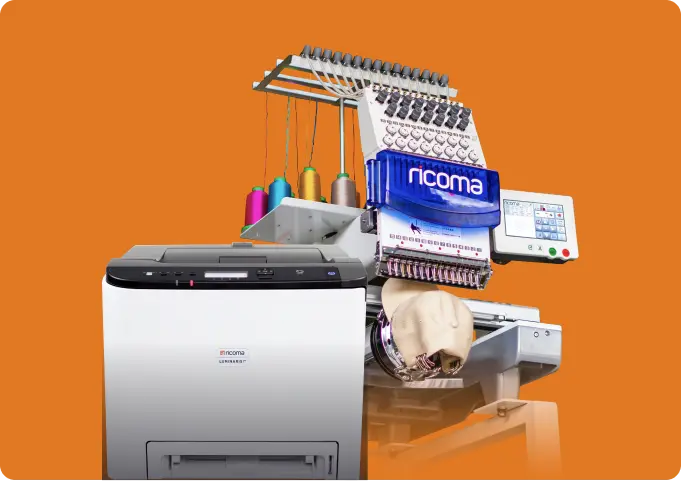
Check out our complete embroidery Start-Up Package that includes everything you need to start your own profitable embroidery business.

Industry's #1
With every one of our machines you get the industry's best, 5-Year Warranty, which gives you confidence in our quality and service.

Digital Image Stitch Creator Digitizing, lettering and editing software
easy speedy versatile complete
fishing
Both D.I.S.C Gold and Platinum are designed to allow both the novice and professional experienced digitizer to create even the most intricate designs with ease and speed. The program is completely customizable so that you can choose to digitize using Bezier, simple draw and freehand drawing tools. You can also choose if you wish the program to decide where each segment starts and ends and the direction of the stitching, or you can make those choices manually.

For beginners D.I.S.C can be used to totally automate the digitizing process, essentially eliminating the learning curve. For the advanced the built-in styles, customization of tools and hotkeys speed up the process and provide a very comfortable and familiar user interface.

D.I.S.C has no equal in the industry today. There are currently no other products able to offer the same benefits and the same power while not sacrificing ease of use and a short learning curve.

text
Prepare to discover a whole new world with D.I.S.C. You will find a product that incorporates the newest technology that is never seen before in embroidery applications. The user friendly interface, automatic functions for every application, and quality control built into every stitch type work together to make it the obvious choice for quickly and easily executing every embroidery task.

D.I.S.C has no comparison, and the huge number of tools available work together so you can enjoy the benefits in every stage of your project.

D.I.S.C creates quality embroidery every time, whether you let it do the work automatically or choose to take tighter control over the individual operations.

D.I.S.C will allow you to increase the quality in your designs with less effort, whether they are simple logos or sophisticated works of art or anything in between.


10 Reasons to Upgrade to the NEW D.I.S.C Gold and Platinum


1. User friendly interface Digitizing has never been faster or easier!
2. Short learning curve Start digitizing on the first day!
3. Excellent stitch quality Both novices and experts will be amazed by the stitch quality!
4. Advanced lettering capabilities The advanced envelope feature allows you to fit lettering into any shape!
5. Connect directly to your RiCOMA machine Send your finished designs directly to the machine and eliminate an entire step!
6. Import both raster and vector artwork files Virtually any type of artwork can instantly be transformed into embroidery!
7. Auto Digitizer Wizard Take the hassle out of digitizing and let the program do it for you!
8. Magic Wand Semi-auto-digitizing tool Keep control of the digitizing process while eliminating the runt work!
9. Templates Place designs on a circle, neckline or in a pattern automatically!
10. Advanced outline and stitch editing Make changes to your design at any step in the process always maintaining quality control!
Embroidery just got a whole lot easier, and you can test drive it today.

Click here to download D.I.S.C demo
Screen-branching-magic-wand
Screen Circle
Screen-Lettering
Screen-Neckline
Screen-Repeat

disc

RiCOMA D.I.S.C Features List
Gold
Platinum
3D workspace
check
check
Auto-set stitch properties based upon fabric choice
check
check
Apply 3D effect
check
check
Slow redraw - simulate sew-out
check
check
Docking toolbars
check
check
Sequence Manager shows Backdrops icons
check
check
3D visualization in 2D and Photorealistic mode showing thread twisting
check
check
Transparent rulers
check
check
Apply 3D embroidery effect to any design
check
check
Customizable tool color schemes
check
check
Unlimited redo undo
check
check
Auto-Digitize with branches
check
check
Convert between stitch types
check
check
Add sections to existing embroidery objects
check
check
Advanced Satin, Applique, Fill with voids, Steil, artwork, symbols (Platinum)
check
Auto-branching in manual Digitizing (Platinum)
check
Color/Segment reorder
check
check
Easily copy, re-size and re-orient in one step
check
check
Alignment abilities between objects
check
check
Auto density adjustments when resizing stitch designs.
check
check
Convert stitch design to outline designs
check
check
Multi design convert and output
check
check
Random jagged stitches (Platinum)
check
Branches
check
check
Magic Wand to auto fill sections of your design with the stitch of your choice (Platinum)
check
Fill pattern editor
check
check
Transform
check
check
Variable density control (Platinum)
check
Closest point control
check
check
Short Stitch control (Platinum)
check
Circle Template
check
check
Neckline Template
check
check
Repeat
check
Customize the working area
check
check
Customize the digitizing tools
check
check
Use hot keys for quicker response and design creation
check
check
Insert comments to objects
check
check
Select/hide by objects
check
check
Select/hide by color
check
check
Select/hide by segment
check
check
Show embroidering sequence
check
check
Re-order objects on sequence manager
check
check
Use guidelines while digitizing
check
check
Load, save color palette and background color
check
check
Use magnifier to view your design better
check
check
Convert vector artwork into editable embroidery designs (Platinum)
check
Convert .jpg or .bmp images to cross stitches or standard embroidery
check
check
Add new text string to existing design
check
check
Adjustable Grid
check
check
Automatic density adjustment during size changes (STO)
check
check
Break Apart Text
check
check
Bezier curves
check
check
Break Apart Text 
check
check
Bezier curves
check
check
Create new design
check
check
Compensation for satin, step (Platinum)
check
Change text setting (typeface, text)
check
check
Change color, background color
check
check
Change Start and End of design
check
check
Change density, stitch length
check
check
Clipart tool to insert designs
check
check
Choose/change from full range of underlay stitches
check
check
Duplicate text string
check
check
Design Slow Redraw
check
check
Envelope lettering in predefined shapes
check
check
Floating, dock-able tool bars
check
check
Full automatic corners (corner on/off)
check
check
Name drop
check
check
Includes 10 pre-digitized fonts
check
Includes 100 pre-digitized fonts (Platinum)
check
check
Join Sections (to branches)
check
check
Reorder sequence of text string
check
check
Resize, Rotate, distort letters of text string
check
check
Ruler, Measure
check
check
Outline node editor
check
check
Edit stitches (Platinum)
check
Online help
check
check
Advanced hot keys
check
check
Left, right, center and stretch justification
check
check
Lettering with automatic, adjustable kerning
check
check
Lettering with intelligent closest point connection
check
check
Lettering in line, arc, circle with rubber band
check
check
Load, save color palette
check
check
Show stitches
check
check
Show stitch and block Shadows
check
check
Show embroidery sequence
check
check
Shrink/Grow, stretch, rotate, slant, text using handles
check
check
Short/Long stitches
check
check
Sequence Manager display letters
check
check
Languages: English, Chinese, German, Spanish
check
check
Print with technical information
check
check
Sequin (Optional)
check
check
Chenille(Optional)
check
check

RiCOMA D.I.S.C. Gold and Platinum Frequently Asked Questions


What are the system requirements for D.I.S.C.?
Minimum System Requirements
Windows XP Home
P3 2Ghz Processor
300 MB hard drive
1GB RAM
CD-ROM Drive
800 x 600 Display
Mouse
Internet Access

Recommended System Requirements
Windows XP Home
P4 2Ghz Processor
1 GB hard drive
2GB RAM
CD-ROM Drive
1024 x 768 Display
Mouse
Internet Access

How do I activate the program?
First choose “Help” and then “Registration” and enter you software level and serial number as illustrated below.


What happens if I lose my serial number?
Contact your distributor.

What do I do if I get a new computer?
Contact software support at kenparsons@ricoma.us

What do I do if I have a question?
Contact software support at kenparsons@ricoma.us

Is online training available?
Yes, you can view the training videos at http://www.ricoma.us/videos.cfm